SpareParts365 – customized solutions for your industry

What is a 3D spare parts catalog system?
‘Traditional’ spare parts catalogs, which are usually supplied in paper form or as PDF files, typically contain 2D representations of the assemblies used. Ideally, these 2D graphics take the form of so-called exploded views, which allow the individual parts and their locations to be clearly shown.

3D spare parts catalog system
However, producing these drawings requires some extra effort, which is why conventional design drawings — generated directly from the CAD system — are still used in some cases. The advantage of reduced production effort is offset by the fact that it is more difficult to locate a required spare part.
What is a 3D spare parts catalog?
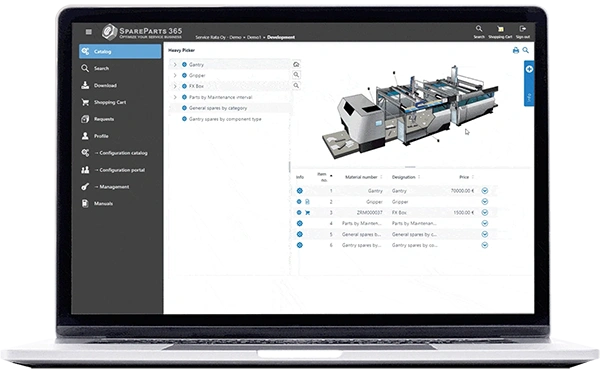
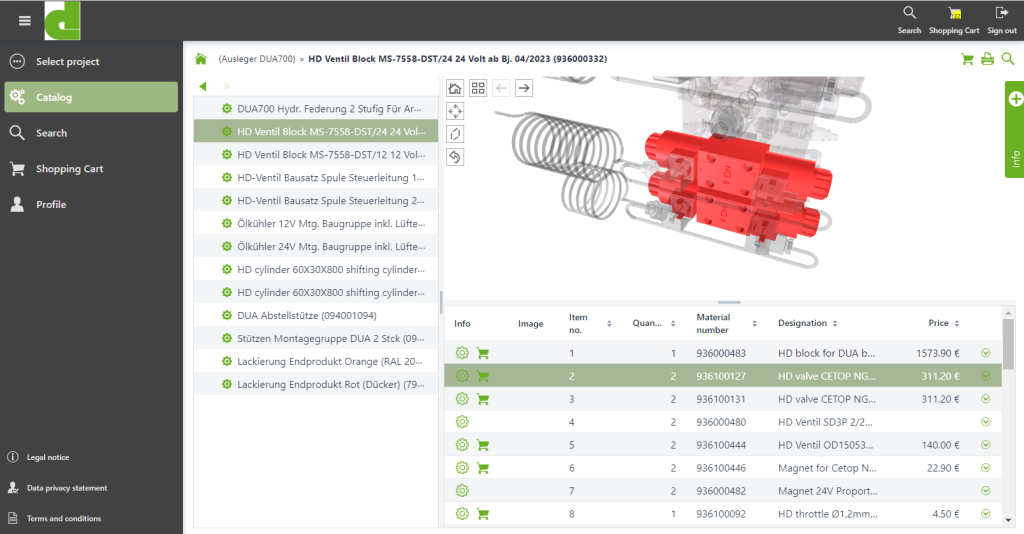
For several years now, companies have therefore been moving towards using 3D data directly from the design phase for spare parts catalogs. Instead of 2D images, 3D models are integrated into the spare parts catalog. The catalog user can rotate and move these models, or select or hide individual parts. The 3D model of an assembly is linked to the corresponding bill of materials, so that selecting a part in the bill of materials highlights the corresponding element in the 3D model – and vice versa.
What is the point of a 3D spare parts catalog?
Advantages
In most cases, the main advantage of using a 3D spare parts catalog is that it eliminates the need to create 2D exploded views.
The steps involved in this process – from creating a perspective exploded view to assigning or matching part numbers in the drawing and the bill of materials – require a considerable amount of effort and demand in-depth technical expertise.
Switching to a 3D spare parts catalog simplifies the entire process chain involved in producing spare parts catalogs. This is achieved because – ideally – no manual tasks are required, and the existing data from the design department and the ERP system can be used directly.
This approach also makes it easier to update the spare parts catalog, as there is no need to manually adjust 2D drawings; instead, the updated design data simply needs to be provided and processed.
From a marketing perspective, there are also strong arguments in favor of 3D spare parts catalogs, as they enable your company to showcase state-of-the-art, modern technology not only in relation to the main product but also in the after-sales sector.
The ‘digital natives’ among users of spare parts catalogs will certainly feel right at home in a 3D spare parts catalog. For other users, it takes a bit of getting used to, but this is not usually a major problem for technically savvy professionals.
Concerns
Before switching to a 3D spare parts catalog, concerns are occasionally raised that should not be ignored.
The issue of data security is frequently raised, driven by concerns about the inadvertent disclosure of specialist technical know-how. We address this point in more detail in the final paragraph.
Whilst displaying an assembly with a few parts is straightforward, the data volume required to display a 3D model of complete machines or systems may, in some cases, be too large for use in a spare parts catalog. Although the scope of a model that can be displayed within a reasonable time has increased significantly thanks to the fast internet connections available today (for the most part), it may still be necessary to work with ‘traditional’ 2D representations or schematic overview drawings at the top-level navigation tiers.
The question of acceptance by catalog users is undoubtedly linked to the specific user group in question and must be considered on a case-by-case basis.
One reason for not using 2D illustrations is the absolute necessity of producing an illustrated printed catalog, as 3D data is, by its very nature, unsuitable for this purpose.
Last but not least, the use of 3D spare parts catalogs requires data of sufficient quality. This means that the data in the 3D models and in the associated parts lists must match so that a link can be established between the two areas.
How is a 3D spare parts catalog created?
In the 3D spare parts catalog, too, the bill of materials – with its hierarchical structure of assemblies – forms the basic unit of information. 3D representations can then be assigned to the individual assemblies.
As the native data from CAD systems cannot be used directly for display in the spare parts catalog – nor, of course, should it be transferred there – a suitable data format must be generated through a series of conversion steps.
This data format must meet the following requirements:
- The file must not contain any actual geometric (‘Brep’) data.
- Can be viewed in most browsers using WebGL technology (HTML5).
- As compact a format as possible, with sufficient quality and a small file size.
Two examples of this are:
- glTF/glb (‘Graphics Library Transmission Format’): a standardised, open data format that can be generated directly by various systems. 3D data in this format can be displayed using WebGL technology.
Tools that import standard formats such as STEP or JT and convert this data into WebGL-compatible 3D data. Common CAD systems can export 3D data in STEP and/or JT, both of which are neutral exchange formats.
3D spare parts catalog with SpareParts365
Providing the 3D data
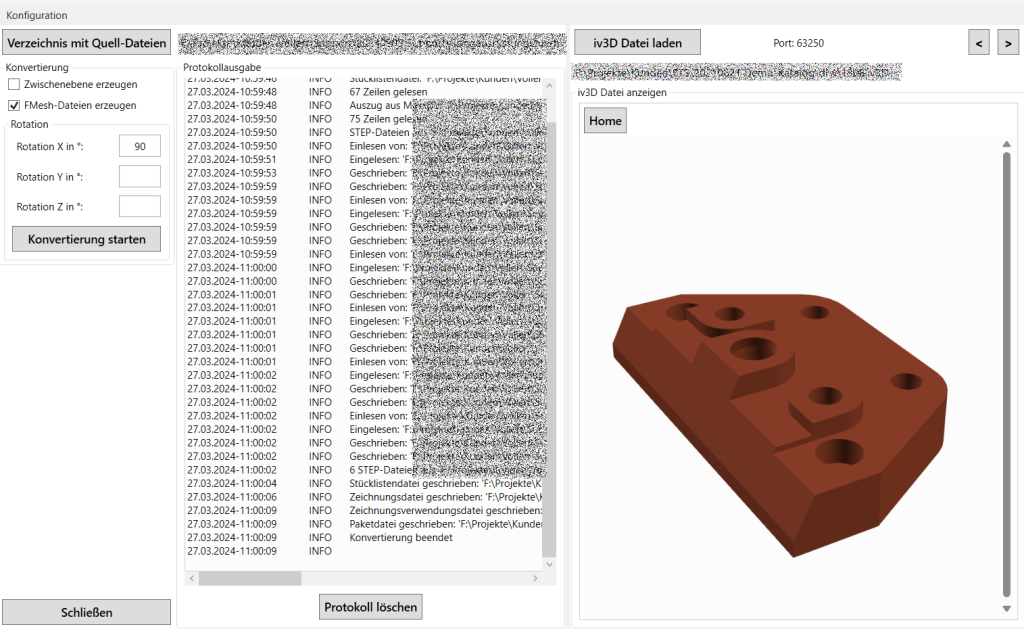
SpareParts365 offers the option of using 3D data from the design phase to create spare parts catalogs. To do this, SpareParts365 utilizes the FinalMesh tool chain.
FinalMesh Studio allows you to import 3D files in JT or STEP formats. A wide range of functions enables you to edit the 3D data, including data reduction and the distortion of components.
The result is compact 3D files that are WebGL-compatible.
Alternatively, glTF/glb files generated by any third-party applications can also be used.
3D data in the spare parts catalog
By linking bills of materials to drawing files, this data can be imported into SpareParts365. An integrated 3D viewer displays the models and offers functions such as linking to the bill of materials, highlighting and hiding parts, as well as rotating and moving them.
The link between the bill of materials and the 3D model is usually established via the material number, which is included in the bill of materials and should also be included in the 3D model data (e.g. as metadata).
3D spare parts catalogs can be used both in the online version and in the SpareParts365 offline viewer, with the same range of functions; all functions are also available on touchscreen devices.
Data converter for 3D data
In addition, we offer data converters that automatically generate individual 3D representations for each assembly listed in the relevant bill of materials, based on 3D models of machines or devices in JT or STEP format.This eliminates the need to provide JT/STEP files for each individual assembly from the CAD systems.
What are the risks associated with a 3D spare parts catalog?
The main concern when compared to a 2D spare parts catalog is usually the risk of components being re-engineered on the basis of the 3D data contained in the catalog.
As the 3D data is rendered (barring complex custom solutions) using the WebGL technology found in modern browsers, it is technically impossible to prevent the 3D data from being extracted in this way.
To assess this risk, we need to briefly look at two technical terms – Brep and tessellation.
- Brep data (short for ‘Boundary Representation’): this refers to the geometric data generated during the design process using CAD systems in the form of surface or solid models.
- Tessellated data: tessellated data does not contain exact geometric data, but approximates the surfaces of the parts using polygons (often triangles) of varying accuracy.
Brep data is extremely sensitive and represents significant value to a company, as it can be used to manufacture or replicate parts with any level of precision. This data must therefore not fall into the wrong hands.
Tessellated data, on the other hand, is not suitable for re-engineering and cannot be imported into a CAD system for ‘further processing’. In theory, this data could be used to produce components in 3D printers, but the accuracy is limited by the resolution of the individual surfaces it contains.
The 3D catalogs commonly used today rely exclusively on tessellated data, which means that the risks of knowledge leakage are greatly reduced.
The following measures can be incorporated as additional safeguards:
- (Partially) automatic randomisation of the surfaces of critical components.
- Hide or replace with schematic diagrams for extremely important ‘know-how components’.
- Reduction in image quality due to a reduction in the number of sub-areas used.
And finally, one should ask oneself what the actual cost-benefit ratio is for attempting re-engineering in this way – and how critically one assesses it in comparison with alternative methods (e.g. measuring a physical part, the ‘human factor’).
Our recommendation: discuss this issue in detail with all relevant stakeholders before making a decision and before launching the project.
Conclusion
A 3D spare parts catalog represents a modern and forward-looking evolution of the traditional spare parts catalog. By utilising 3D data directly from the design process, it offers numerous advantages, particularly in terms of the efficiency of catalog creation, user-friendliness and the ability to update content. The interactive display of assemblies makes it much easier to locate and identify spare parts and offers significant added value, particularly for technically savvy users.
At the same time, the use of a 3D spare parts catalog requires a certain level of data quality and an awareness of potential risks, particularly with regard to the protection of intellectual property. However, the risk of reverse engineering can be effectively minimized through the use of tessellated data and optional protection mechanisms such as data distortion or reduced display quality.
Solutions such as SpareParts365 now provide powerful tools that enable the simple and secure integration of 3D data into spare parts catalogs – both online and offline. Overall, the benefits clearly outweigh the drawbacks, particularly if implementation is carefully planned and coordinated with all relevant stakeholders.
Share:
Share this post
You might also be interested in...