

 Portal
 Online Editorial
 Online Catalog
 Shop
Shop 3D Spare Parts Catalog
 Integration
 Administration
 Hosting
 Extensions
Around the clock and from anywhere

Smart SpareParts365 Functions
The SpareParts365 spare parts catalog software includes a large number of smart functions “out of the box” and supports your employees and customers.
With our extensive extensions, you can further customize your system to your requirements.
Portal
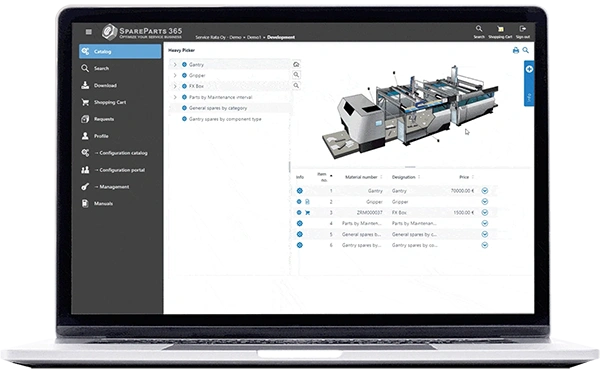

With the SpareParts365 portal, you can offer your customers and employees a central point of contact for all relevant information. Thanks to the clear structure and responsive design, you have access to all documents, data and functions always, regardless of whether you are on desktop or mobile.
Keep track of your service information and spare parts data always – all in a single, user-friendly system.
Administration
Manage users, rights and system settings easily and centrally.
Corporate design, settings, user administration and rights – all in one place. Customize the system to suit your company and manage connections to ERP systems or external shops. Control access for different user groups efficiently.
Create and publish
Create catalogs once and publish them in various media.
Integrate data and keep it up to date. Catalogs are created once and are available in various formats: interactive online, digital or as a PDF. Enable your customers to discover components and assemblies in an interactive spare parts catalog.
Inform
Create reports at the touch of a button. Usage data can be exported as PDF, Excel, or CSV files.
Built-in reports make it easier for you to keep track of how the catalog is used and give you a transparent insight into orders.
Order
Seamless integration of a web shop, ERP connections and ordering functions.
Offer your customers an integrated web shop that is seamlessly connected to your ERP and external shops. All orders are managed centrally so that an overview is always maintained.
Online Editorial
With the Online Editorial feature, you can efficiently manage and publish catalog data. You decide which data formats to use and how the information is made available to your customers – as an interactive online catalog, digitally, or in the classic PDF format.
Keep all data consistently up-to-date and easily accessible.
Configuration
Individual catalog customizing for maximum flexibility.
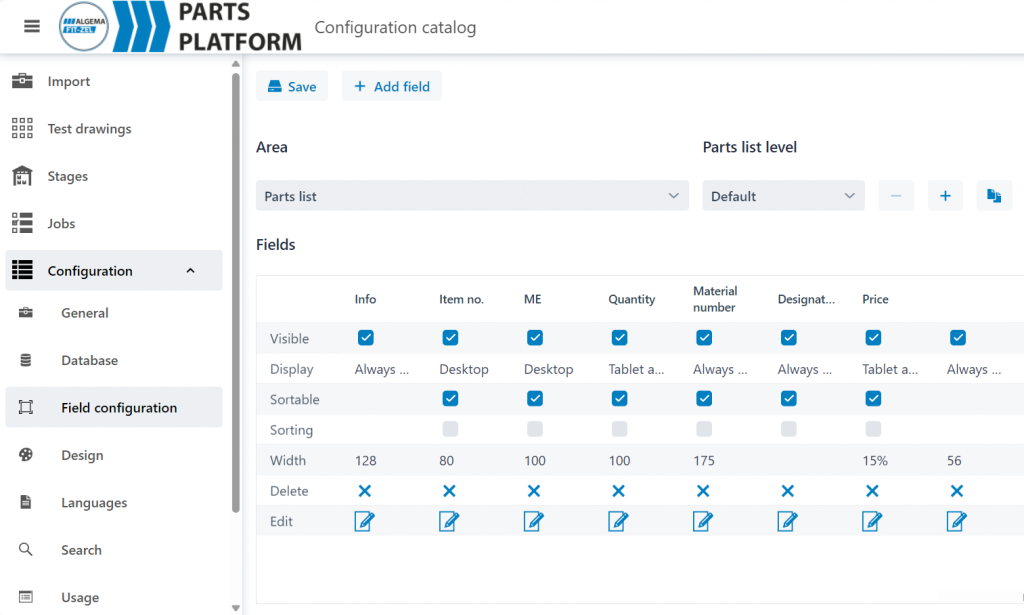
Customize the catalog to your specific needs by deciding which components, drawings, and documents are displayed. Achieve maximum flexibility through comprehensive configuration options.
Data Import and Integration
Efficiently and automatically integrate data sources.
Import PDF files, plans, bills of material, 3D models, and drawings – fully automatically, semi-automatically, or manually. Optimize data integration based on your existing structure and data situation.
Hotspot Recognition
Automatic linking of drawing and bill of material data.
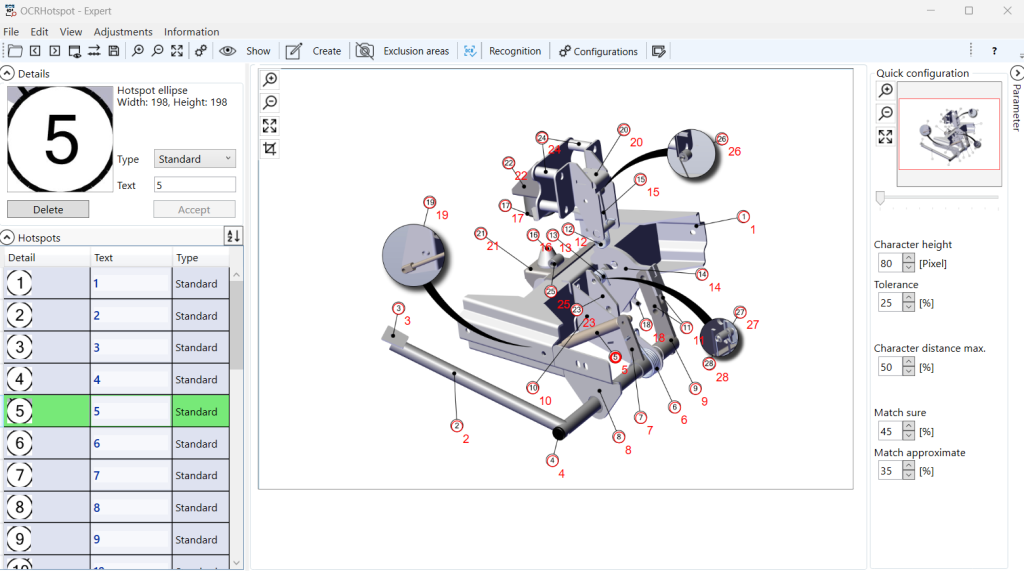
The system automatically recognizes the connections between drawings and bills of material, allowing users to find relevant information quickly and efficiently. If automatic detection doesn’t work perfectly right away, the hotspot recognition can be trained with your data.
Configuration of the online catalog
Online Catalog
Integrate data, keep data current, create the catalog once, and make it available in various media:
interactive spare parts catalog, digital spare parts catalog, PDF printout.
Provide all Data and Documents
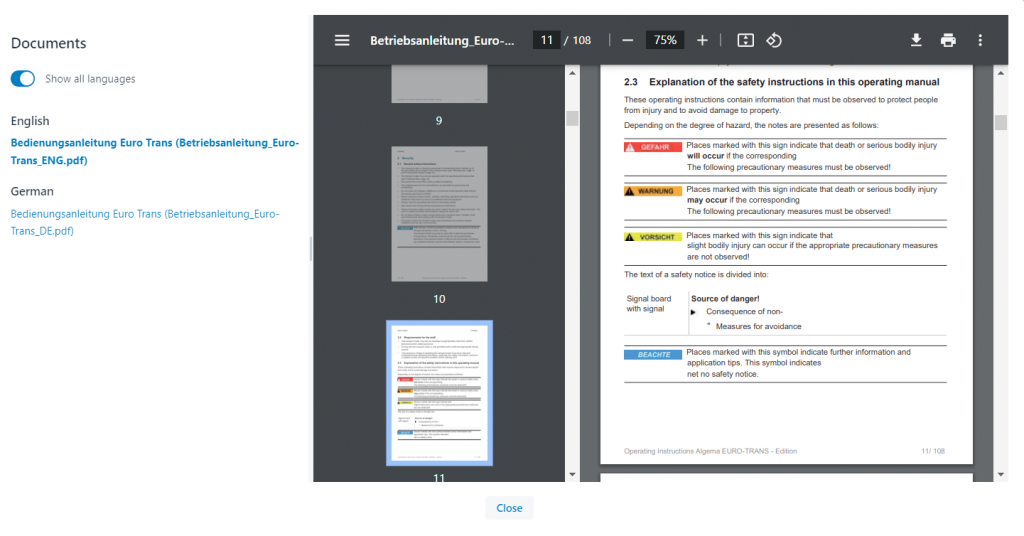

Provide all necessary data and documents online and offline. Users can view plans, explore components in 3D models, and efficiently search assemblies.
Use the integrated environments for development, testing, and production to import, review, and finally release your data. Thanks to the integrated backup environment, you can revert to a secured state if you wish to undo imports.
SpareParts365
Search and Find
Efficient searching through filter and full-text functions. Find terms with wildcards (*), exactly, and using fuzzy search.
Thanks to filter functions and full-text search, users can quickly find the desired information – whether it’s components, assemblies, or plans.
Selection via Serial Numbers
Shop
The integrated Shop offers your customers a convenient and efficient way to order spare parts and products directly.
Thanks to the connection to ERP systems and external shop systems, the entire ordering process is handled seamlessly and managed centrally.
Orders
Fast and easy order management directly in the system.
The integrated shop provides a user-friendly interface where customers can quickly and easily process their orders. All orders are managed centrally in your system and are visible to customers at all times. This keeps the entire process transparent and clear, from product selection to order confirmation.
Connection to ERP
Seamless integration of your ERP system for a continuous ordering process.
The shop is directly connected to your ERP system, so orders are automatically integrated into your internal processes. This reduces manual effort and ensures fast and error-free processing. Thus, the ordering process remains continuous, efficient, and transparent, without duplicate data entry or sources of error.
Connection to external Shops
Connect external web shops for maximum flexibility and reach.
If you already use external web shops, you can easily integrate them into our system. The flexible interface structure allows for a seamless connection, so orders can be managed centrally via both internal and external shops. This increases your reach and offers your customers multiple ordering channels.
Selection via serial numbers
3D Spare Parts Catalog
With our 3D spare parts catalogs, you minimize the effort involved in creating and updating catalogs to a minimum.
At the same time, we offer you a modern and user-friendly solution that simplifies your processes and presents your company in a contemporary way in the after-sales area.
Creation
The direct use of design data greatly simplifies the creation of spare parts catalogs. Instead of complex 2D exploded views, 3D models are used, which are seamlessly generated from the existing CAD data.
The process chain for creating spare parts catalogs is optimized. Manual steps are eliminated, and data is used directly from the ERP system and design. This saves you time and significantly reduces effort.
Updating
With SpareParts365 and its 3D technology, manual adjustments to 2D representations are no longer necessary. Design changes are immediately reflected in the catalog.
By linking 3D data with the bill of materials, updating is efficient. No new exploded drawings need to be created, and no OCR technology is required for text recognition.
Marketing
Use SpareParts365 as a modern marketing tool. Present your customers not only with products, but also with advanced after-sales technology.
The “digital natives” among users will immediately find their way around your 3D spare parts catalog. But even for technically savvy professionals who are still accustomed to 2D, the switch doesn’t pose a major problem.
Intuitive Operation
The 3D spare parts catalog SpareParts365 offers user-friendly and intuitive operation. Thanks to the automated linking of the 3D model and the parts list, users can quickly and easily find the desired spare part.
Navigating through the catalog is simple and requires no special training. Even complex assemblies can be effortlessly searched, allowing every user – whether technically savvy or not – to work efficiently.
Integration
Maximum compatibility through flexible interfaces – seamless connection to your systems.
SpareParts365 offers you extensive possibilities for integration into existing IT infrastructures.
Whether it’s ERP, shop systems, or CAD/PLM applications – powerful interfaces allow you to efficiently exchange data and automate processes.
REST API
Seamlessly import and retrieve data via the REST API.
Our REST API enables flexible and scalable data integration. You can seamlessly access data, import or export it into your system, and link your existing IT solutions with our platform. This open interface ensures easy connection to a wide variety of systems, regardless of the respective IT architecture.
Connection to ERP
Connect your ERP system for smooth data exchange.
By connecting to ERP systems like SAP, Microsoft Dynamics, or other common solutions, data exchange between systems is optimized. Orders, stock levels, customer data, and other business processes can be automated and synchronized, reducing manual intervention and errors.
Connection to Shop Systeme
Integrate external shop systeme for centralized order management.
Integrate existing web shops or marketplace systems like Magento, Shopify, or other platforms. Orders, stock levels, and customer data are centrally managed in your system, making the entire e-commerce process more efficient and easier to control.
CAD/PLM Connection
Direct links to CAD and PLM systems for continuous data processing.
SpareParts365 supports the seamless integration of CAD and PLM systems, allowing technical drawings, 3D models, and product data to be processed in real-time. This integration improves collaboration between development, production, and after-sales service, as all relevant data is centrally available.
Administration
Centralized control and customization – user-friendly management of your system settings and rights.
With the Administration function, you retain full control over the system.
Manage user rights, set up interfaces, and adapt the system to your corporate design. Everything is centrally and intuitively controllable.
Corporate Design
Adapt the design to your company’s appearance.
The system can be adapted to your company’s corporate design. Integrate your colors, logos, and design guidelines so that the portal always presents itself consistently and professionally. This not only strengthens brand perception but also ensures a user-friendly and consistent appearance.
Plug-In Interface
Flexibly extend the system with additional functions via plug-ins.
Extend the system according to your needs. Via the Plug-In interface, you can seamlessly integrate external tools and extensions. This offers you the flexibility to adapt the system to specific requirements without having to forgo a unified platform.
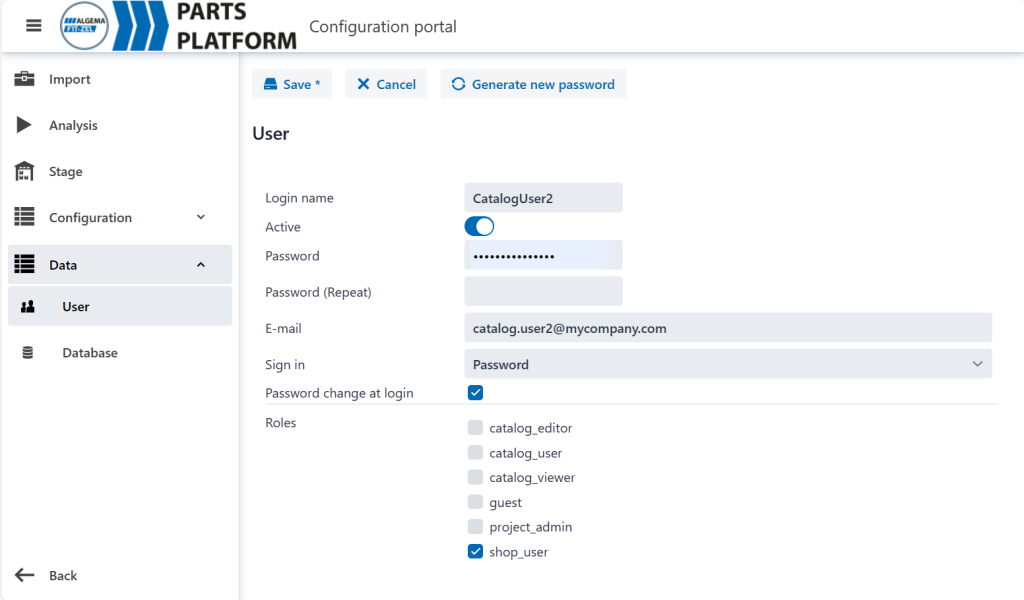
User and Rights Management
Manage user access and permissions efficiently centrally.
The user and rights management allow you to define different roles and access rights. You can determine who can see or edit what information, and you always maintain an overview of access rights. This ensures maximum security and flexibility by ensuring different user groups receive exactly the information they need.
User configuration
Hosting
Flexible Hosting Options – secure and powerful for every requirement. We offer flexible hosting solutions that adapt to your company’s needs.
Whether you prefer a cloud-based, on-premise, or VPN-based solution, our hosting options ensure security, reliability, and performance.
Cloud Hosting
Scalable and flexible cloud solution for dynamic requirements.
Our Cloud Hosting solution offers maximum flexibility and scalability. Your data and applications are available at all times, without you having to worry about maintenance and updates. It’s ideal for companies with dynamic requirements, as resources can be flexibly adjusted as needed. In addition, the cloud solution offers the highest availability and data security through state-of-the-art encryption and backup strategies.
On-Premise
Full control through hosting on your own infrastructure..
For companies that desire full control over their IT infrastructure, On-Premise hosting is an excellent choice. With this option, the system is installed and operated directly on your own servers, giving you complete sovereignty over your data and systems at all times. This solution is particularly suitable for companies with special security requirements or strict compliance regulations.
Catalog Export
Self-Service Portal for catalogs fpr offline operation under Windows.
Use the Catalog Export for offline service operations. This allows your service technicians to use the catalogs without being directly connected to the internet.
Headline
Lorem ipsum dolor sit amet, consectetuer adipiscing elit. Aenean commodo ligula eget dolor.
Use the Catalog Export for offline service operations. This allows your service technicians to use the catalogs without being directly connected to the internet.
Functions
Extensions
Flexible adaptation to your requirements – customized extensions for your system.
With our extension options, you can adapt the system to specific business requirements.
Whether you want to use the Hotspot Tool, make individual customizations, or integrate plug-ins – we offer you the flexibility to tailor your system precisely to your needs.
Hotspot Tool
Simplify navigation by automatically linking drawings and bills of material.
With the Hotspot Tool, you can automatically link drawings and bills of material, allowing your customers to find components and assemblies faster. Through automatic recognition of hotspots within the data, relevant information becomes immediately visible and accessible, which significantly improves the efficiency of navigation and information retrieval.
OCR Hotspot
Data Converters and Preprocessors
BIf necessary, data converters and preprocessors ensure correct data consistency.
Every company has its own requirements. For one-time data transfer or for ongoing imports, customer-specific data converters and preprocessors ensure that data from different systems is correctly merged.
Customizing and Plug-Ins
Whether it’s adapting the user interface, individual workflows, or special functionalities – with our tailored extensions you get the maximum of your solution.
Extend the system with Plug-Ins to integrate additional functions and tools. The Plug-In interface allows you to seamlessly integrate external tools or your own extensions into the system. This keeps your system flexible and future-proof, as it can be easily expanded with new technologies or business requirements.